
Reduce image file size without loosing image quality with this 100% free Online Image Compressor.
Whether you need to compress an image for a website, email, social media or everyday sharing, this tool makes the process simple and fast.
Open Image Compressor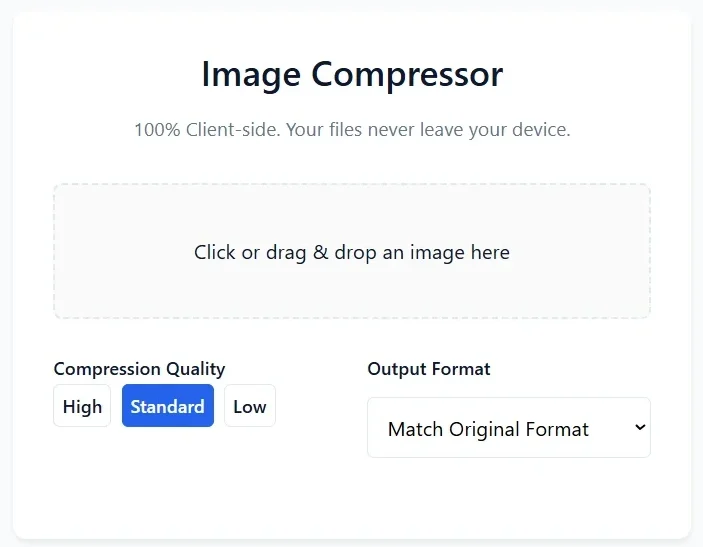
Why Use Our Image Compressor?
Large image files can take longer to upload, download and display. Compressing images can help you create smaller files that are easier to store, share and use online.
100% Client-Side
Your image can be processed directly in your browser. No server-side upload is required for client-side compression.
Fast Compression
Compress images directly from your browser without installing additional image compression software.
Choose Quality
Select High, Standard or Low compression quality depending on whether quality or smaller file size is your priority.
See Your Savings
Compare the original size, compressed size and percentage of savings before downloading your compressed image.
How to Compress an Image Online
Compressing an image takes only a few simple steps. You don’t need advanced image-editing software to reduce your image file size.
Upload Your Image
Click the upload area or drag and drop your image into the Image Compressor.
Choose Compression Quality
Select High, Standard or Low quality based on the file size and image quality you need.
Select the Output Format
Choose an available output format or use Match Original Format when you want to retain the original format.
Review the Compression Result
Check the original size, compressed size and percentage of savings. You can also preview the compressed image.
Download Your Compressed Image
When you’re satisfied with the result, click Download Compressed Image to save the smaller file.
Which Compression Quality Should You Choose?
The best compression setting depends on how you plan to use your image. Higher quality generally preserves more visual detail, while stronger compression can produce a smaller file.
Best for Image Quality
Choose High when preserving visual details is more important than achieving the smallest possible file size.
Balanced Compression
Standard is a practical choice for everyday image compression, websites, email and general sharing.
Smaller File Size
Choose Low when reducing image file size is the main priority, such as when dealing with strict upload limits.
What Is Image Compression?
Image compression is the process of reducing the amount of data required to store an image. A compressed image generally takes up less storage space and can be faster to upload, download and display.
Image compression is especially useful for websites because large image files can increase the amount of data a browser needs to download. Optimizing images can therefore be an important part of creating a faster and more efficient website.
The goal of image compression is to find a practical balance between file size and visual quality.
Why Should You Compress Images?
Reducing image file size can make images easier to store, upload, download and share. Image compression is useful in many everyday situations.
- Faster website loading: Smaller images require less data to download.
- Smaller file sizes: Compressed images use less storage space.
- Faster uploads: Smaller files are generally easier and quicker to upload.
- Email attachments: Compression can help when attachment-size limits are an issue.
- Online forms: Smaller images can help meet file-size restrictions.
- Website optimization: Optimized images can help reduce the amount of data required to load web pages.
- Mobile browsing: Smaller images require less data to transfer over mobile networks.
What Can You Use an Image Compressor For?
Compress Images for Websites
Reduce image file sizes before adding photos and graphics to your website or blog.
Compress Photos for Email
Make large photos smaller and easier to attach, upload and share through email.
Reduce Image Size for Online Forms
Compress images when a website or application has a maximum file-size requirement.
Compress Product Images
Reduce the size of e-commerce product images while keeping an appropriate level of visual quality.
Compress Images for Social Media
Create smaller image files that are easier to upload and share.
Optimize Images Before Uploading
Compress images before adding them to websites, blogs, online stores or other platforms.
JPG vs PNG vs WebP: Which Image Format Should You Use?
Different image formats are designed for different types of images. Choosing an appropriate format can help you balance image quality and file size.
| Format | Best For | Common Use |
|---|---|---|
| JPG / JPEG | Photographs and colorful images | Photos, blogs and websites |
| PNG | Graphics and transparency | Logos, screenshots and graphics |
| WebP | Efficient web images | Modern websites and web applications |
There is no single image format that is best for every situation. Photographs often work well with JPEG or WebP, while graphics that require transparency may be better suited to PNG.
Can You Compress an Image Without Losing Quality?
Image compression can involve a trade-off between file size and visual quality. With a suitable compression setting, an image can become significantly smaller while maintaining a visually similar appearance.
If maximum image quality is important, choose a higher compression quality. If achieving the smallest possible file size is your main goal, stronger compression may provide greater savings.
The ideal setting depends on the original image, its format and how the compressed image will be used.
Private Image Compression in Your Browser
Your Files Stay on Your Device
Our image compressor is designed for client-side processing, allowing image compression to take place directly in your web browser.
This can be especially useful when working with personal photos, screenshots, documents or other images that you prefer not to upload to an online server.
More Image Tools
Explore more online image tools to convert, resize, optimize and work with your images directly from your browser.
Frequently Asked Questions
An image compressor is a tool that reduces the file size of an image while attempting to maintain an acceptable level of visual quality. Smaller images are easier to store, upload and share.
Upload your image to the compressor, select a compression quality, review the compressed result and download the optimized image.
Yes. You can use the online image compressor to reduce image file sizes without installing image compression software.
It can. The amount of quality change depends on the compression method and settings you choose. Higher quality settings generally preserve more visual detail, while stronger compression produces smaller files.
If the compressor operates entirely client-side, images can be processed directly in your browser without being uploaded to a server.
The amount of compression varies depending on the original image, its format, dimensions and compression settings. Some images can become significantly smaller while still looking visually similar.
Use High when image quality is the priority, Standard for a balance between quality and file size, and Low when achieving a smaller file size is more important.
Image compression and image resizing are different processes. Compression primarily reduces file size. Whether image dimensions change depends on how the particular compressor is designed.
Smaller image files require less data to transfer and can help reduce the amount of data a web page needs to load. Image optimization is therefore useful for website performance.
Yes. Compressing an image can reduce its file size, which may help when an email service, website or online form has a file-size restriction.
Compress Your Image Online
Reduce image file size quickly and easily. Choose your compression quality, review your savings and download the compressed image.
https://theoddsofyoupdf.site/